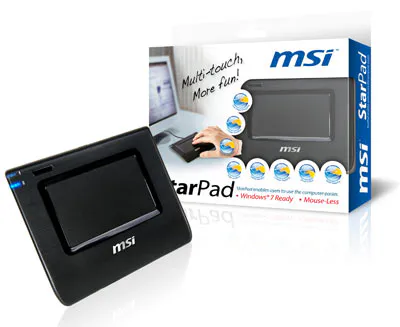
Features

  • Sensitive touch pad to provide smooth handwriting
  • Use a single finger for navigation and multiple fingers for gestures
  • Simple gestures make it easy to scroll, zoom, rotate, move backward or forward
  • Easy USB connection to PC, laptop or desktop


Feature                      


Simple & Ultra-Sensitive Touch Panel

Ultra-sensitive touch panel supports multi-touch functions. It enables users to operate the computer easily and eliminate the need to learn it.


Hardware Install

1.Connect the attached USB cable to the USB connector on your PC.
2.Connect the mini USB connector to the Star Pad.


Specifications

Resolution 300dpi
Report Rate 80 point per second
Touch Panel Multi-touch, Capacitiver TP
Interface USB2.0
Operating temp O~60C
Operating Humidity 0~95%
System Repuirements Microsoft Windows XP/SP2/Vista
Active area 78mm x 45.5mm
Total Size 124.5mm x 101mm x 9mm


System Requirements

  • One available USB 2.0/1.1 port 
  • Operation System Support: Windows® XP/VISTA/WIN 7


Package Contents

• MSI StarPad
• Utility/ Driver CD
• Quick User's Guide
• USB2.0 Cable

All images and descriptions are for illustrative purposes only. Visual representation of the products may not be perfectly accurate. Product specification, functions and appearance may vary by models and differ from country to country . All specifications are subject to change without notice. Please consult the product specifications page for full details.Although we endeavor to present the most precise and comprehensive information at the time of publication, a small number of items may contain typography or photography errors. Products may not be available in all markets. We recommend you to check with your local supplier for exact offers.