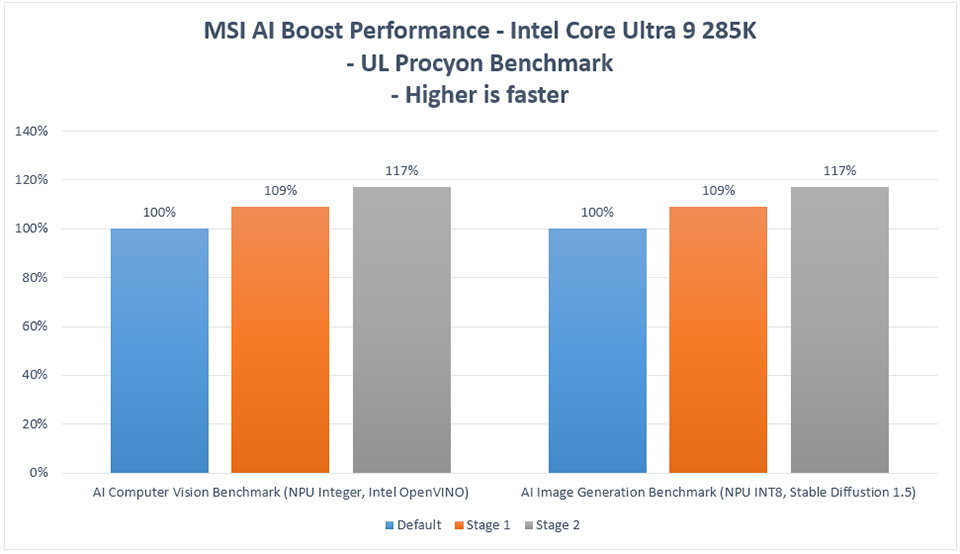
MSI AI Boost Enhances Intel Core Ultra 9 285K AI Performance by 17%
Motherboards
The Intel Core Ultra 200S series processors are equipped with a Neural Processing Unit (NPU) designed to handle AI workloads efficiently. To further enhance AI computing performance, MSI introduces the AI Boost feature, which can be enabled in the BIOS.
MSI AI Boost offers three performance modes: Stage 1, Stage 2, and Stage 3, allowing users to select the optimal mode based on their processor's capability.
For example, when tested with the Intel Core Ultra 9 285K using the UL Procyon AI benchmarking tools, the NPU performance improved by approximately 9% in Stage 1 mode and up to 17% in Stage 2 mode.
How to Enable MSI AI Boost
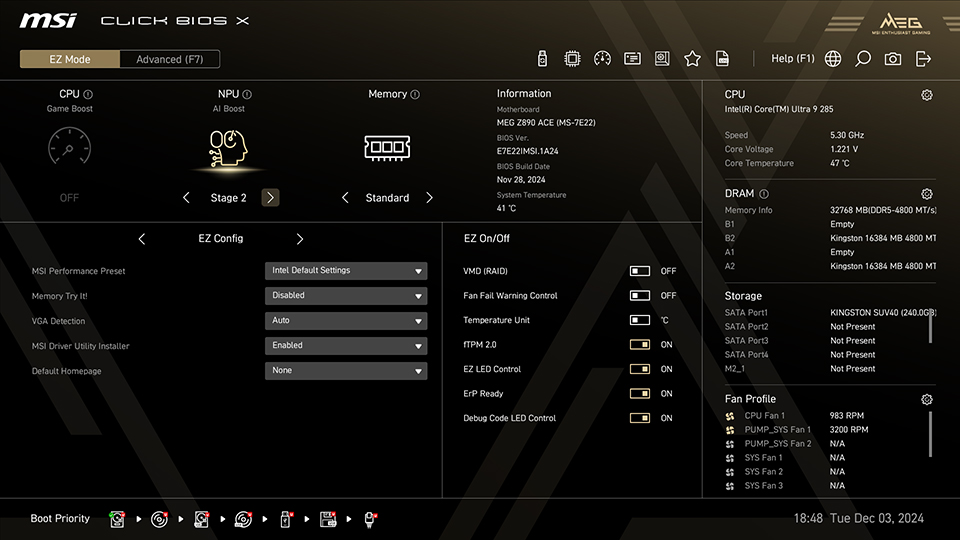
Simply access MSI Click BIOS X in EZ Mode and select your preferred AI Boost mode from the AI Boost option at the top of the screen.
Test System:
CPU: Intel Core Ultra 9 285K
Motherboard: MSI MEG Z890 ACE
Memory: Kingston FURY Beast DDR5-4800 16GBx2
Graphics Card: MSI GeForce RTX 4090 SUPRIM X 24G
SSD: Kingston SNV2S/2000G
CPU Cooler: MSI MAG CORELIQUID I360
Power Supply: MSI MEG Ai1300P PCIE5
Operating System: Windows 11 Pro 24H2, build 26100.2314
CPU: Intel Core Ultra 9 285K
Motherboard: MSI MEG Z890 ACE
Memory: Kingston FURY Beast DDR5-4800 16GBx2
Graphics Card: MSI GeForce RTX 4090 SUPRIM X 24G
SSD: Kingston SNV2S/2000G
CPU Cooler: MSI MAG CORELIQUID I360
Power Supply: MSI MEG Ai1300P PCIE5
Operating System: Windows 11 Pro 24H2, build 26100.2314
Note: Enabling MSI AI Boost involves overclocking, which may affect system stability.
MSI Z890 Motherboards: https://www.msi.com/Landing/intel-arrow-lake-core-ultra-z890-b860-h810-best-ai-pc-gaming-motherboard.