MSI Gaming Laptops Provide Dedicated Keyboard Design
Laptops
MSI knows a decent keyboard design is what gamers care the most, and crucial for the win. As a result, MSI specially customizes gaming laptops’ keyboard to fit the need during gameplay, including the strength while typing, keycap design, backlit, layout, and software support.
Metal Shielding
The lack of keyboard strength support underneath is often complained by gamers as it wobbles while clicking the keyboard. Therefore, metal shielding mechanism is added underneath the keyboard for all the MSI Gaming laptops. Gamers can control the keyboard at their best as the feedback of keys remains precise even when gamers hit the keys hard during intensive battles.

↑ Metal shielding mechanism is added underneath the keyboard for all the MSI Gaming Laptops.
Translucent Keycap and Backlit Design
The impressive keyboard outlook incorporating a futuristic design, with translucent keycaps implemented on the WASD, arrow keys, and power button that enable gamers to clearly see the key even playing under the dark. In addition, with the programmable per key RGB or 4 zone RGB backlit keyboards, gamers are able to create their unique color or mode while playing.

↑ MSI RTX 40 Gaming Laptops implement translucent keycaps on the WASD, arrow keys, and power button.
User Friendly Layout
MSI Gaming Laptops’ keyboard layout is specially designed for gamers. With enlarged arrow keys and control key, gamers are able to press comfortably while playing and working. In addition, the Windows key and Fn key could be switched in MSI Center to avoid mistouching, so that when gamers press the Windows key during game, it won’t pop up from the game. Moreover, for PerKey RGB keyboard that applied in Titan GT/Raider GE/Vector GP/Stealth, full keys could be customized with Macro Key while launching certain application or combining serial keys during gameplay.

↑ MSI provides user-friendly keyboard layout for gamers.
Software Control
1. MSI Center - Mystic Light
Mystic Light empowers gamers to personalize the RGB light effects of their Pulse and Katana series laptops with 4-zone RGB keyboards. To access Mystic Light, head over to the Features tab. If gamer can’t find this feature, just install it from the Feature Sets tab.
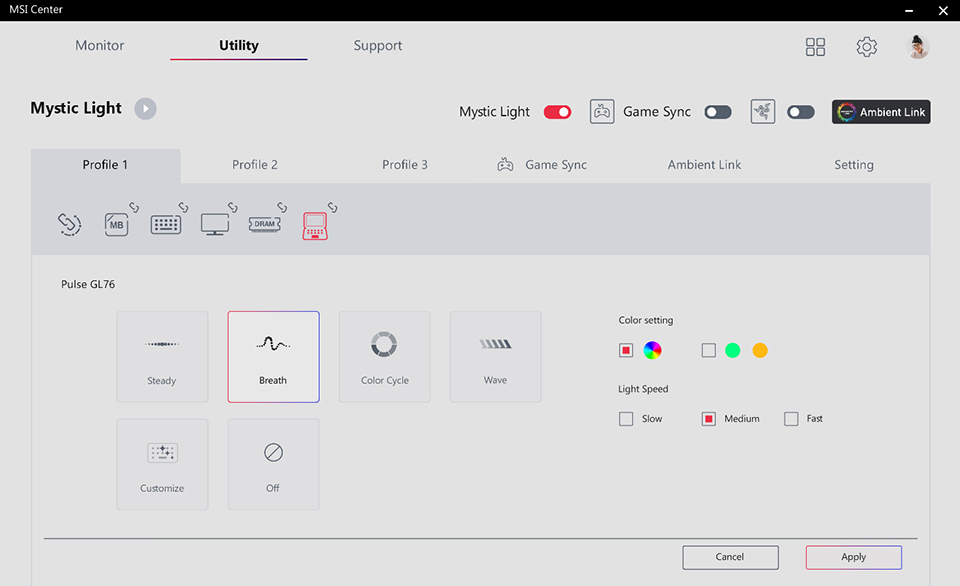
↑ Mystic Light offers a plethora of themes to choose from. Moreover, gamer can adjust the color, speed, and direction to suit the preferences.

↑ Gamer could setup color in 4 different zones with beautiful gradient color. With three profiles available, gamer can effortlessly save and switch between various keyboard backlighting themes.
2. SteelSeries GG
MSI has been cooperated with SteelSeries for years for the best keyboard experience in Titan GT/Raider GE/Vector GP/Stealth series. In SteelSeries GG software, gamers are able to customize the color of PerKey RGB keyboard, and provide full customizable Macro Key that could launch certain function or application, or shortcut of serial actions in games, which effectively saves a lot of time of hitting double keys or even triple keys.

↑ In SteelSeries GG, gamer could customize the Macro Key.
Moreover, the Game Sense in SteelSeries GG software will show the real-time status on the keyboard like the health, and the bullets have left in selected game titles. When playing the music, the PerKey RGB keyboard could even dance with the music with Audio Visualizer APP. To know how to operate the app, visit the tutorial video for more information.

↑ SteelSeries GG offers various keyboard application to enjoy the light while playing or listening to music.
The Latest MSI Laptop Keyboard Solution

The latest MSI Gaming Laptops have all the keyboard solutions regarding to the strength, keycap design, backlit, layout, and software support. Gamers won’t need to connect external keyboard or downloading certain software for the best gaming experience.
For more information about MSI Gaming Laptops and SteelSeries keyboard software info, please find the link below.
MSI Gaming Laptops: https://www.msi.com/Laptops
MSI x SteelSeries: https://www.msi.com/Landing/SteelSeriesGG
MSI x SteelSeries: https://www.msi.com/Landing/SteelSeriesGG